myQ Smart Garage Door Video Keypad: 15-Minute Install, Easy Setup
I swapped my old LiftMaster keypad for the myQ Smart Garage Door Video Keypad in about 15 minutes. Clear video, easy app, one subscription catch.
The myQ Smart Garage Door Video Keypad is worth buying if you already have a Chamberlain, LiftMaster, or Craftsman opener and want a camera where your old keypad was. The swap took me about 15 minutes start to finish and the video is clear and crisp. Skip it if you refuse to pay a subscription for the smart detection features.
This post contains affiliate links. I may earn a commission at no extra cost to you.
How this review was made: written from my own video review of this product. Every opinion here is my own, from using it myself.
Quick Verdict
The install is 15 minutes total: five to pull the old keypad, ten to mount, sync to the opener, and set up the app. The video is clear, the AI labels people by name and spots vehicles separately, but you’ll recharge the battery every few months and the smart detection needs a paid subscription.
Buy if you:
- Already have a keypad on the side of your garage and want a camera in that same spot
- Run a Chamberlain, LiftMaster, or Craftsman opener made after 1993
- Hand out your master PIN to kids, neighbors, or delivery drivers and hate doing it
- Want to see the driveway without mounting a separate camera
Skip if you:
- Don’t want to pull the unit off the wall to recharge a battery. I didn’t hardwire mine, so that’s on my list now
- Refuse to pay a subscription. The AI person/car/package detection and recorded video history sit behind one
- Have an opener that isn’t Chamberlain, LiftMaster, or Craftsman
Clicking takes you to Amazon. As an Amazon Associate we earn from qualifying purchases — pricing and availability subject to change.
| Camera | Wide-angle, 160-degree field of view |
|---|---|
| PIN codes | Up to 16 customizable, time-specific |
| Audio | Two-way talk |
| Compatibility | Chamberlain, LiftMaster, Craftsman openers made after 1993 |
| Power | Removable rechargeable battery or hardwired |
| App | myQ (free tier; premium features need a subscription) |
Five Minutes to Pull the Old Keypad Off
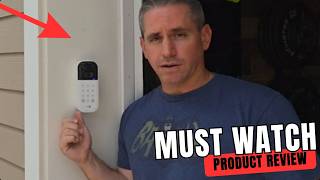
The old LiftMaster keypad came off with two screws. One was hiding in the little battery compartment, and the second one was basically just holding it onto the mount. Lift up, back out the second screw, done. That part took about five minutes.
The myQ Smart Garage Door Video Keypad didn’t line up with both of the old holes, but one of them worked, so I reused it. Might as well. Before I drilled the second hole I checked that it was level, drilled, and it was completely secure. There’s a screw hole on the top and on the bottom, because you can mount this in two different ways depending on which angle you want. I wanted mine angled out toward the road.
The Openers It Won’t Talk To
This is a Chamberlain, LiftMaster, and Craftsman device, and anything made before 1993 is out. That’s the hard line. Mine’s a LiftMaster, and programming it meant getting up on a ladder to the opener on my ceiling and tapping a blue square button. Yours is going to be in a different spot with a different color. The app walks you through what to press for your specific make and model, which is the part I’d have been lost on otherwise.
The other situation this isn’t built for: a garage with no existing keypad location that’s within reach of your Wi-Fi. You’re connecting this over Wi-Fi and Bluetooth, so a detached garage at the far end of a property is a question mark.
Where a Smart Garage Door Keypad Fits Next to a Doorbell Cam
Most people solve this by bolting a separate camera near the garage and leaving the dumb keypad alone. That’s two devices, two apps, two power situations. This combines them into the footprint you already had drilled into your wall.
The buying demand backs that up. Amazon has it sitting at #30 in Tools & Home Improvement right now, against a 90-day average rank around #596, with more than 10,000 bought in the past month. The price on this one also swings a lot and it’s currently well under where it’s usually sat over the last three months, close to the lowest it’s been tracked at. Worth checking the live price rather than assuming.
I Walked Right in Front of It to Check the Picture
I walked directly into frame from about ten feet out and the video held sharp edges, no motion smear, no blown-out highlights from the afternoon sun behind me. The 160-degree lens pulls in the full driveway-to-doorway width without the fisheye warp you get from cheaper wide-angle cameras.
The part I didn’t expect to like as much as I did is the labeling. You can tag people with a specific name, so I labeled myself. Now the app tells me Craig was there instead of just “motion detected.” It separates a vehicle from a person, so I know whether something pulled into the driveway or somebody walked up to the door. That’s a different kind of notification than the generic ping you get from a cheap camera, and it’s the difference between actually reading alerts and muting them after a week.
The wide-angle lens covers driveway to doorway, so where you mount it matters more than anything else. Mount it wherever you need to in order to see what you want to see, and take the extra minute to pick between the two mounting angles before you commit to a hole.
It Doesn’t Replace Your Opener
This is a keypad upgrade, not a new opener. A lot of folks see “smart garage door” on a listing and assume the box replaces the motor unit on the ceiling. It doesn’t. Your existing opener stays exactly where it is, and this syncs to it. That sync step is quick and the app handles it, but you do have to do it, and you do have to physically press the learn button on your opener to make it happen.
The other thing buyers get wrong is the PIN situation. You’re not stuck with one code anymore. You can create separate codes in the app and set time-specific passes, so the dog walker’s code works Tuesday afternoons and nothing else.
The Battery Is the Annoying Part
I’m not hardwiring mine, which means I’ll be pulling the battery out to recharge it. Chamberlain did at least think about this: the bottom screw doesn’t need a screwdriver, so you pop that screw out, pop the unit off, and pull the battery. Easier than it could’ve been. It’s still a recurring chore I didn’t have with the old dumb keypad that ran on a cell for years.
Second annoyance: the good stuff costs extra. AI detection for people, cars and packages, plus recorded video history, all sit behind a myQ subscription. There’s a free trial, which is nice, but plan on paying if the labeled alerts are what sold you.
Fifteen Minutes for a Lot More Peace of Mind
Start to finish, including the app setup and syncing to the opener, this took me about 15 minutes. That’s a short job for what you get out of it. Connect it to your phone, connect it to your Wi-Fi and Bluetooth, mount it on the side of the garage, and you’re ready to go.
The app organizes everything under one screen: PIN management, alert sensitivity, two-way audio, and the live feed. I set up a time-restricted code for the dog walker in under two minutes and haven’t touched the settings since.
Fifteen minutes of work replaced a dumb keypad I’d ignored for years with a camera that tells me whether Craig or a delivery van just pulled up, by name, not just a motion ping. If you have a compatible opener and an existing keypad hole, the install is a non-event. Check the live price, it’s been swinging well below its 90-day average lately.
Pros
- About 15 minutes total install, five of that just removing the old keypad
- Very clear, crisp video when I walked into frame
- App labels people by name and distinguishes a vehicle from a person
- Two mounting angles, so you can point it toward the road
- Battery pops out without a screwdriver
- Managing pins, notifications, and audio/video settings in the app is straightforward
Cons
- Mounting holes didn’t line up with my old keypad, so I had to drill a second hole
- Battery recharging means pulling the unit off the wall unless you hardwire it
- AI detection and video history require a myQ subscription
- Only works with Chamberlain, LiftMaster, and Craftsman openers made after 1993
Frequently Asked Questions
Can I hardwire it instead of using the battery?
Yes, hardwiring is an option. I chose not to on mine, which is why I’ll be popping the battery out to recharge it. If you’ve got wiring at that spot already, hardwiring removes the only recurring chore this thing has.
How many PIN codes can I hand out?
Up to 16 unique codes, and you set them in the app. You can also make them time-specific, so a code only works on certain days or hours. That’s the feature for delivery drivers and service people.
Does it hold up outside in weather?
It’s weather-resistant and built to live on the exterior of your garage frame, same as the keypad it replaces. Mine’s mounted on the side of the garage, fully exposed, angled out toward the road.
Can I talk to someone standing at the garage?
Yes, it has two-way audio. You can speak through it from the app and hear what’s going on around the garage. Handy if a driver is standing there with a package and no idea where to leave it.
What tools do I need for the install?
A screwdriver, a drill, and a level. The old keypad comes off with a screwdriver, and you’ll likely need to drill one new hole because the holes don’t line up perfectly. Check level before you drill that second one.
Get it now
myQ Smart Garage Door Video Keypad
Get the best price on Amazon →Affiliate link. See the disclosure at the top of this post.
🛍️ Shop everything in this video
Every product mentioned, in one place. These are affiliate links, so I may earn a small commission at no extra cost to you.
🛍️ MyQ Smart Video Keypad with Camera: check price on Amazon →
🛍️ LiftMaster Garage Door Opener: check price on Amazon →
🛍️ MyQ App: check price on Amazon →